Help:Contents
From CNBH Acoustic Scale Wiki
Contents |
Common syntax and function information
The links below contain useful general information about Wiki syntax and functions.
- Editing: Cheatsheet
- Formatting: basics, links, images (extended syntax), tables
- Equations: Latex Math Symbols, or all in a short pdf cheatsheet.
- Include a sound or a movie: Help:Include a sound or a movie.
- Using the reference manager: Help:Simple Wiki Bibliography.
- Page to convert CSV files to wiki markup
Tags
These are additional tags that are specific to this implementation of the MediaWiki.
Numbering
The <clabel/> and <cref/> tag family are here to provide numbering and referencing capabilities. You can use these tag to auto-number uniquely identified objects, such as figures, equations, sounds, etc... Just put a label with the <clabel name="The name of the label"/> tag providing unique label, and you can then refer to this tag using the <cref name="The name of the label"/> tag. For example:
You can ever refer to the labelled object (see object <cref name="toto"/>) before to create it.

* Now this is object <clabel name="toto"/>.
* And this is object <clabel name="titi"/>.

And you can of course refer to objects after they are labelled (as object <cref name="toto"/> and <cref name="titi"/>).
Will produce:
You can ever refer to the labelled object (see object 1) before to create it.
And you can of course refer to objects after they are labelled (as object 1 and 2).
You can also specify a "group". Numbering is incremented independently in each group:
Here is toto in group A: <clabel name="toto" group="A"/>, and toto in group B: <clabel name="toto" group="B"/>.
Here is toto in group A: 1, and toto in group B: 1.
Special commands are also provided for equations and figures.
[[Image:Pipe.JPG|center|thumb|200px|<figure name="Pipe"/> – Guess what, this is the picture of a pipe...]]

<formula name="pythagorean theorem">a^2+b^2=c^2</formula>

Do you think there is any relationship between the equation <formulaRef name="pythagorean theorem"/> and the <figureRef name="Pipe"/>?

a2 + b2 = c2(1)
Do you think there is any relationship between the equation 1 and the Figure 1?
Note how the word "Figure" is added automatically while the word "equation" must still be typed.
Note: The numbering of the headings is disabled by default but each user can change his own options in order to activate it: Preferences, then Misc, and tick "Auto-number headings".
Email addresses on the wiki
If you put email addresses directly on to the wiki they may be detected by automatic search engines and your inbox could be flooded with spam. You can get around this problem by obscuring your email address using one the following syntax tools.
<email>toto@cam.ac.uk</email>,
<email address="toto@cam.ac.uk">Toto</email>,
<email address="toto@cam.ac.uk"/>,
Toto <email address="toto@cam.ac.uk></email>
, , , Toto
The address is only visible to web browsers that enable Javascript.
Page access restriction
It is possible to restrict the access to a page to some groups only, for example if a paper is not ready yet for publication on the wiki. To do so, just include the following tag anywhere in the page:
<restrictPage/>
This statement will prevent the page from being viewed by users that are not in the sysop group nor in the bureaucrat group. Instead they see a message signalling that the page access is restricted. This tag can be placed anywhere but it is probably better to put it on top of your page to find it back easily later. You must be aware that this is not an definitive protection and that the data can still be accessed in some way.
You can also give a list of groups for which the page is not restricted:
<restrictPage except="group1,group2"/>
The page will then be accessible to all members of group1 and group2. Note that the members of the bureaucrat group always have access to all the pages.
To restrict a page to everyone (except bureaucrat) just specify bureaucrat as the only authorized group.
Attention: if you are not a member of the sysop group, or more generally not a member of the a group that will have access to the page, you will not be able to see your page anymore! You can check which groups you are member of in Special:Listusers.
When you link to a page that is restricted, you should warn the reader that he might not be able to access this page. To do so, the standard way is to use the RestrictedLink template:
Instead of setting up a normal link [[page title]], for instance:
[[Main Page]]
You set up a restricted link {{RestrictedLink|page title}}:
{{RestrictedLink|Main Page}}
That will produce:
Main Page  Access to this page is currently restricted
Templates
The following templates have been created on this wiki: BACK, FORWARD, FORMULA and Underconstruction.
BACK
The purpose of BACK is to provide a backward link to the parent page.
{{BACK|Main Page}}
Will produce:
FORWARD
Similarly, the purpose of FORWARD is to provide a forward link to a following page.
{{FORWARD|Main Page}}
Will produce:
It is recommended to add it at the bottom of the page.
FORMULA
The purpose of FORMULA is to provide a stylish environment for numbered formulaes.
{{FORMULA|<math>x=\frac{1}{\tau} \int_0^\tau \sin(t)\ dt</math>}}
Will produce:
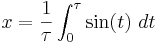
Be careful that the number is generated by the style and should not be referred to in the text as it may change. Alternatively you may prefer to use the <formula> tag that offers proper numbering.
Underconstuction
While a page is under construction, it should be marked using Underconstruction at the very top.
{{Underconstruction}}
Warning
This template can be used to display a warning message in the content of the article.
{{Warning|This is a warning message}}
Will produce:
 |
Attention! This is a warning message |
ParentArticle
When an article originally comes from a published paper, the ParentArticle template can be used to advertise the original reference:
{{ParentArticle|ives:2008}}
Will produce:

The argument is a reference id from the Simple Bibliography Manager.
An alternative (i.e. better) wiki editor
The default Editing facility of the wiki is from Wikipedia and it is not very convenient; the window is small, and there is no syntax highlighting, which make the code a bit difficult to read. If you are using Firefox, you can easily improve the editor using Greasemonkey and wikEd:
- Install the Greasemonkey addon for Firefox: https://addons.mozilla.org/en-US/firefox/addon/748. You may have to restart Firefox at this point. Then,
- Install the wikiEd script: http://en.wikipedia.org/w/index.php?action=raw&ctype=text/javascript&title=User:Cacycle/wikEd.user.js.
You can activate and deactivate wikEd with the toggle.
